Aircraft Coloring Book Pages for Kids
For creators, educators, and small business owners building print-on-demand (POD) products—especially those targeting early learners, aviation enthusiasts, or STEM-aligned classrooms—Aircraft Coloring Book Pages for Kids is more than a design asset. It’s a production-ready workflow component: a set of high-resolution, KDP-tested interior pages designed to integrate cleanly into existing publishing pipelines, reduce prepress friction, and support scalable output across physical and digital channels.
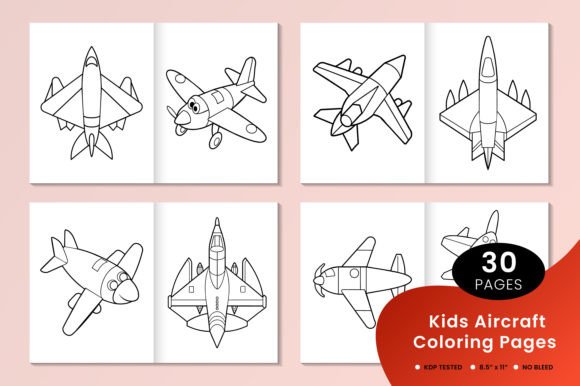
These pages aren’t generic clipart inserts. They’re intentionally structured for real-world use—pre-sized to 8.5 × 11 inches, delivered in both editable vector (EPS) and print-optimized individual PDFs, and built without bleed to meet Amazon KDP’s strict interior formatting requirements. That means less time troubleshooting margins, fewer rejected uploads, and faster time-to-market when launching a new coloring book title.
How These Pages Fit Into Your Publishing Workflow
Whether you’re developing a themed activity book for a school district, expanding your POD catalog with niche educational content, or creating branded learning tools for a flight academy’s youth outreach program, Aircraft Coloring Book Pages for Kids serves as a foundational layer—not a final product. Think of it as a modular interior kit that slots into your established process at multiple points:
- Before launch: Use the EPS files to customize line weight, add safety labels (e.g., “Pilot Only” or “Cabin Crew Area”), or integrate brand colors before converting to final PDFs. This is especially valuable if you’re tailoring content for bilingual classrooms or special education settings where visual clarity and consistency matter.
- During production: Drop individual PDFs directly into your KDP manuscript upload—no reformatting needed. Because each page is isolated and correctly sized, you avoid common issues like misaligned spreads, inconsistent scaling, or unintended cropping during auto-layout.
- After publication: Reuse the same assets across formats—convert select pages into slide decks for classroom instruction, extract SVG paths for interactive web-based coloring tools, or repurpose illustrations as printable flashcards for vocabulary building (e.g., “turboprop,” “flap,” “cockpit”).
This flexibility supports iterative development. You don’t need to commit to a full 30-page book upfront. Start with five pages to test audience response on Etsy or Teachers Pay Teachers, then scale based on engagement metrics—not guesswork.
Compatibility and Integration With Common Tools
The dual-format delivery (EPS + PDF) ensures compatibility across platforms and skill levels. Designers using Adobe Illustrator or Affinity Designer can modify linework, adjust spacing for different age groups (e.g., thicker outlines for ages 3–5), or add instructional callouts. Non-designers—teachers, homeschool coordinators, or marketing managers—can open and print the PDFs immediately, even without specialized software.
For teams using collaborative tools like Google Workspace or Notion, the individual PDF structure makes version control straightforward: name files by aircraft type (“Boeing_737_Page_12.pdf”) or difficulty level (“Intro_Jet_Page_04.pdf”), then store them in shared folders with clear naming conventions. This avoids the confusion that comes with monolithic PDFs where locating a specific illustration requires scrolling through dozens of pages.
If you’re integrating these pages into a larger curriculum or product suite—say, pairing them with a “Build Your Own Paper Airplane” activity guide—the consistent sizing and clean linework ensure visual cohesion. No mismatched proportions or inconsistent stroke weights that undermine perceived quality.
Quality Control and Long-Term Usability
KDP testing isn’t just a checkbox—it reflects how these pages behave under real constraints: ink spread on standard matte paper, readability at 100% zoom on mobile devices, and tolerance for minor printer calibration variance. The absence of bleed eliminates white borders caused by trimming inconsistencies, a frequent pain point when scaling across printers or fulfillment partners.
Long-term, the modularity supports updates without full rework. If aviation regulations change (e.g., updated FAA livery guidelines), you only revise affected EPS files—not the entire book. Likewise, if user feedback shows children struggle with certain aircraft silhouettes, you can replace just those pages—not redesign the whole interior.
Organization matters here. The zipped folder includes all 30 pages as discrete files—not a single multi-page PDF—so you can audit, tag, and archive efficiently. For creators managing multiple titles, this prevents accidental cross-contamination (e.g., inserting a helicopter page into a fixed-wing-only book).
Practical Implementation Tips
Here’s how to get immediate value from Aircraft Coloring Book Pages for Kids—without overcomplicating your process:
- Start small: Pick three pages representing distinct aircraft categories (e.g., commercial jet, vintage propeller plane, modern drone). Use them to build a low-cost mini-book for Instagram giveaways or email list sign-up incentives.
- Leverage metadata: When uploading to KDP, include descriptive keywords in your backend search terms—“aviation coloring pages,” “airplane activities for kids,” “STEM coloring book”—but anchor them in actual usage context, not keyword lists.
- Batch your edits: If customizing the EPS files, group changes by function: one pass for line thickness adjustments, another for adding text labels, a third for exporting final PDFs. This reduces errors and speeds up iteration.
- Test before scaling: Print one page on your home or office printer first. Check contrast, line clarity, and spacing at actual size. If lines appear too thin or faint, adjust the EPS stroke weight before exporting all 30.
- Document your modifications: Keep a simple log (even a Notion table or spreadsheet) noting which pages you’ve altered, why, and what version number you assigned. This pays off when updating or auditing later.
For educators, these pages also serve as neutral scaffolding: no branding, no dated references, no licensing restrictions that limit classroom reuse. You can legally project them during lessons, embed them in LMS modules (like Canvas or Moodle), or adapt them for IEP accommodations—such as enlarging specific pages for students with visual processing needs.
Real-World Use Cases Beyond Publishing
A small aviation museum used these pages to create a free downloadable activity pack for their “Young Aviators” summer camp—replacing outdated, low-res handouts with crisp, engaging interiors they could brand with their logo and contact info. A freelance curriculum designer integrated selected pages into a K–2 science unit on forces and motion, pairing each aircraft with a short experiment prompt (“Draw how air flows over this wing shape”). A boutique stationery brand layered subtle aircraft outlines from the set behind handwritten journal prompts—turning coloring pages into mindful reflection tools for adult aviation fans.
In each case, the utility came not from novelty, but from reliability: predictable dimensions, clean vectors, and format discipline. That reliability compounds over time—whether you’re releasing one title per quarter or managing a catalog of 50+ POD books.
If you're evaluating whether Aircraft Coloring Book Pages for Kids fits your current priorities, ask: Does it reduce a recurring bottleneck? Does it align with an upcoming launch, grant deadline, or seasonal campaign? Does it let you spend less time formatting and more time connecting with your audience? When the answer is yes to any of those, it’s not just an asset—it’s leverage.